
Thursday, August 16, 2018
Dot mapping as an alternative to raster maps
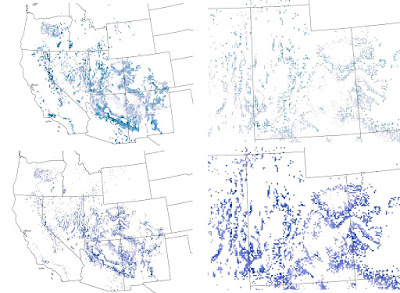
Recently I was helping a colleague with a mapping problem. The basic problem was that we had high resolution raster maps of climate data, but a very discontinuous study area with lots of holes. This made visualizing color gradations difficult. I tried coarsening the raster with some success, but it still didn't look the way I was hoping. I also tried a 3x3 filter to smooth the data and fill in gaps. That made the map look worse! Finally I resorted to converting each raster cell to a point and depicting it that way on the map. I found the the dot map was much easier to control and that the map was much easier to interpret. Take a look at the map below. The top row shows the dot approach and the bottom row shows the raster. The left column is the entire study area and the right is a blow up of Utah. One of the nice options is to use the advanced symbology tab in ArcMap to draw the rarer higher values on top. Let me know what you think.

Friday, July 13, 2018
Animation of the Mekong River - Tonle Sap flood pulse
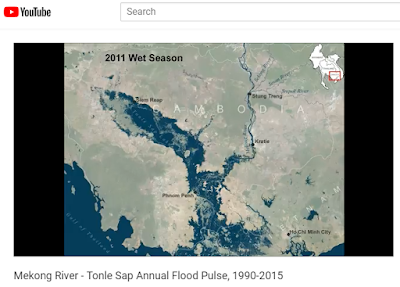
Southeast Asia experiences dramatic swings in precipitation and river flows as a result of the Asian monsoon. Nowhere is this more dramatic than the Mekong River flowing through Cambodia and Vietnam. In Cambodia the mighty Mekong River winds its way across a vast flood plain. During the rainy season the flow of the Mekong increases so much that it reverses the flow of the Tonle Sap River increasing the size of the Tonle Sap Lake by 6 times or more. This animation shows the heart beat of the Mekong River, the annual flood pulse using data derived from Landsat satellites from 1990 to 2015. Some years are omitted due to cloud cover.
To view the animation on YouTube click HERE
To view the animation on YouTube click HERE

New paper - Cheatgrass Die-Offs: A Unique Restoration Opportunity in Northern Nevada
Owen Baughman recently authored "Cheatgrass Die-Offs: A Unique Restoration Opportunity in Northern Nevada" in the journal Rangelands. This nice short piece highlights some of the restoration opportunities presented by cheatgrass die-offs. Cheatgrass die-off is a term that refers when a whole stand of cheatgrass fails to regenerate due to a pathogen. Usually this results in nearly complete lack of regeneration which can clearly be seen from both high resolution imagery and moderate resolution imagery, such as Landsat. Owen completed his master's thesis in 2014. I'd expect several papers related to his thesis out soon.
This paper also highlights some of the findings from our more detailed paper on remote sensing of cheatgrass die-offs "Development of remote sensing indicators for mapping episodic die-off of an invasive annual grass (Bromus tectorum) from the Landsat archive" in Ecological Indicators. The Great Basin Landscape Ecology Lab continues to explore ways in which remote sensing can be used to map cheatgrass die-offs across the Great Basin and to use imagery to quantify spatial pattern and relate it to climatic and other abiotic factors. Joe Brehm is a current master's student in the lab who is focusing on remote sensing of cheatgrass die-offs for his thesis. I'm looking forward to seeing Joe's findings.

Tuesday, March 27, 2018
New paper - Contrasting climate niches among co-occurring sub-dominant forbs of the sagebrush steppe
Sarah Barga, Beth Leger, and myself just got a paper accepted in Diversity and Distributions! It is titled "Contrasting climate niches among co-occurring sub-dominant forbs of the sagebrush steppe". The paper projects species distribution models for ten sub-dominant herbaceous forbs in the Great Basin. We then looked at niche overlap and found very little between the ten species. There was no relationship between phylogentic distance and niche overlap. We also looked at how species responded to temperature and precipitation variability and found that there were differences among different life forms. We hope that our paper findings will help conservationists understand which species may be more or less suitable to climatic variability.


Monday, March 26, 2018
Blended image to classification in ArcMap
A while back I did a vegetation classification in ArcMap using data collected from a drone. The method was fairly simple and I was pretty pleased with the result. I wanted to simultaneously display the image and the classified map. I had seen some pretty nifty blended images on the web that were created in Photoshop, but since I don't have Photoshop on my computer I opted to try to figure out how to do this in ArcMap. In general, I followed the steps to this tutorial - https://blogs.esri.com/esri/arcgis/2008/10/14/fade-to-white-background-effect/
However, I took some liberties and deviated from it a bit. My classification was a raster so in order to accommodate that I sliced the raster up into discrete slices going from north to south. For each raster I set the transparency to increase by 7%. Likewise I did the same with the segment outlines (the black lines).
Below is the resulting image. In case you are interested in the actual vegetation here is what each color represents: blue = sagebrush, green = other shrub, pink = cheatgrass+forbs, tan = bare soil, and gray = dead shrub (rare in this image). The UAV image was take by AboveGeo near Doyle, California. The upper portion of the image is intact sagebrush desert while the lower part was previously burned.

However, I took some liberties and deviated from it a bit. My classification was a raster so in order to accommodate that I sliced the raster up into discrete slices going from north to south. For each raster I set the transparency to increase by 7%. Likewise I did the same with the segment outlines (the black lines).
Below is the resulting image. In case you are interested in the actual vegetation here is what each color represents: blue = sagebrush, green = other shrub, pink = cheatgrass+forbs, tan = bare soil, and gray = dead shrub (rare in this image). The UAV image was take by AboveGeo near Doyle, California. The upper portion of the image is intact sagebrush desert while the lower part was previously burned.

Saturday, March 3, 2018
New tool - Patch and Gap Metrics Toolbox for ArcGIS
 |
Forest ecologists, vegetation ecologists, and others are
frequently interested in characterizing the structure of patches and gaps on
the landscape. Typically, data, such as tree crown size, are collected in
quadrats. In order to synthesize these data for each quadrat I developed the Patch
and Gap Metrics Toolbox for ArcGIS. This tool takes polygons of quadrats
combined with polygons of representing tree crowns, shrub crowns, or some other
patch on the landscape, and calculates the number of patches and area of those
patches as well as gaps. There is a version of the tool that allows the user to
specify a radius to filter the gaps by in order to ensure that only large gaps
are included in the output. You can download the tool by clicking HERE.
The Patch and Gap Metrics Toolbox only requires two input
layers: 1) a polygon shapefile of patches (need not be dissolved) and 2) a
polygon shapefile of quadrats. The quadrats can be any shape or size and can
even be overlapping. In addition to this the quadrat polygons need a quadrat ID
field upon which dissolving can be based on. Finally, for the version of the
tool that accommodates additional gap size criteria there is a parameter that
specifies the radius of gaps to be considered. For example, a value of 6 would
eliminate any gaps with a diameter less than 12.

Above: There are two inputs required by the Patch and Gap
Metrics Toolbox. The picture on the left shows a polygon shapefile representing
the patches. Note that adjacent patches do not need to be merged. The tool will
do this automatically. The picture on the right shows overlapping quadrats.
Quadrats need not be overlapping.
The main output of this tool is a point shapefile
representing the centroid of each quadrat that is attributed with the following
fields:
COUNT_SHAPE – Count of the number of patches
SUM_ SHAPE – Total area of the patches in the quadrat
MEAN_ SHAPE – Average size of the patches in the quadrat
STD_ SHAPE – Standard deviation of the patches in the quadrat
MIN_SHAPE – Minimum number of patches in the quadrat
MAX_SHAPE - Maximum number of patches in the quadrat
SUM_ SHAPE1 - Total perimeter of patches in the quadrat
COUNT_SHAP_1 – Count of the number of gaps
SUM_ SHAP_1 - Total area of the gaps in the quadrat
MEAN_ SHAP_1 - Average size of the gaps in the quadrat
STD_ SHAP_1 – Standard deviation of the patches in the quadrat
MIN_ SHAP_1 - Minimum number of patches in the quadrat
MAX_ SHAP_1 - Maximum number of patches in the quadrat
SUM_ SHAP_2 – Total perimeter of gaps in the quadrat
SUM_ SHAPE – Total area of the patches in the quadrat
MEAN_ SHAPE – Average size of the patches in the quadrat
STD_ SHAPE – Standard deviation of the patches in the quadrat
MIN_SHAPE – Minimum number of patches in the quadrat
MAX_SHAPE - Maximum number of patches in the quadrat
SUM_ SHAPE1 - Total perimeter of patches in the quadrat
COUNT_SHAP_1 – Count of the number of gaps
SUM_ SHAP_1 - Total area of the gaps in the quadrat
MEAN_ SHAP_1 - Average size of the gaps in the quadrat
STD_ SHAP_1 – Standard deviation of the patches in the quadrat
MIN_ SHAP_1 - Minimum number of patches in the quadrat
MAX_ SHAP_1 - Maximum number of patches in the quadrat
SUM_ SHAP_2 – Total perimeter of gaps in the quadrat
In addition to attributing each quadrat centroid with the above values there are also two additional outputs. In the image below the darker green polygons with red outlines show patches as generated by this tool. The tan polygons with purple outlines show the gaps using a 6 meter radius filter. The remaining light green areas are classified as neither patch nor gap.
|
Tuesday, January 23, 2018
New tool - spider diagrams for ArcMap

Spider lines depict Euclidean distance-based routes that connect each pair of points. They are a useful tool for visualization. In landscape genetics this represents the isolation-by-distance hypothesis. Previously there were other 3rd party tools that achieved this on the Arcscripts website. Currently it appears that this functionality is only available with a Business Analyst license of ArcGIS. This tool make a few assumptions:
1. You wish to connect all pairs of points
2. You have a point shapefile
3. The point shapefile is in a projected coordinate system
4. The point shapefile has fields called "Easting" and "Northing" that represent the X and Y coordinates respectively. If these fields are not named this excatly then the tool will fail
5. You have a field that describes the name of the pairs of the site (point).
Please do not use a geodatabase feature class.
Output line shapefile (or geodatabase if you specify that) attributed with the following:
1. Input FID
2. Easting
3. Northing
4. Easting_1
5. Northing_1
6. Near_FID
7. Site
8. Site_1
If you end up using this tool for published work please feel free to cite this as:
Dilts, T.E. (2018) Spider Diagram Tools for ArcGIS (insert your version here). University of Nevada Reno, Available at: https://www.arcgis.com/home/item.html?id=fb7d157782a549b182c957abbaaf45c2.
You can download the tool by clicking HERE.
Subscribe to:
Posts (Atom)