The University of Nevada Reno has removed our website due to accessibility issues. Two years back Joe Brehm and Adriano Matos put together a nice Google Earth Engine script to composite Landsat imagery. The script is available through the Earth Engine site. You'll need a Google login and a Google Drive account before you can run it. Adriano and Joe did a great job of documenting their script, so it is fairly easy to follow. The script lets users add several vegetation indices in addition to the reflectance data.
https://code.earthengine.google.com/60bc1e1140539d4d8946351a4a9c180b
Showing posts with label remote sensing. Show all posts
Showing posts with label remote sensing. Show all posts
Monday, June 22, 2020

Tuesday, October 29, 2019
New poster "Unmanned aerial vehicles can revolutionize shrubland mapping"
I have a new poster on our lab's website titled "Unmanned aerial vehicles can revolutionize shrubland mapping". You can view it by clicking HERE.


Friday, July 26, 2019
Congratulations to Joe Brehm and Anna Knight for successfully defending their theses

Thursday, July 18, 2019

Wednesday, January 30, 2019
Anna Knight wins AGU Outstanding Student Presentation Award

Congratulations Anna Knight on winning Outstanding Student Presentation at the 2018 American Geophysical Union Meeting for her poster “Geomorphic and disturbance controls on vegetation dynamics in Great Basin riparian ecosystems “. Click HERE to view Anna’s poster. You can read more about AGU’s Outstanding Student Presentation by clicking HERE.
AGU is a huge conference with thousands of students attending. Anna's award is a testament to her hard work and innovative cutting-edge techniques. Anna is completing her master's thesis under the advisement of Dr. Peter Weisberg. You can view her webpage by clicking HERE.
Friday, July 13, 2018
New paper - Cheatgrass Die-Offs: A Unique Restoration Opportunity in Northern Nevada
Owen Baughman recently authored "Cheatgrass Die-Offs: A Unique Restoration Opportunity in Northern Nevada" in the journal Rangelands. This nice short piece highlights some of the restoration opportunities presented by cheatgrass die-offs. Cheatgrass die-off is a term that refers when a whole stand of cheatgrass fails to regenerate due to a pathogen. Usually this results in nearly complete lack of regeneration which can clearly be seen from both high resolution imagery and moderate resolution imagery, such as Landsat. Owen completed his master's thesis in 2014. I'd expect several papers related to his thesis out soon.
This paper also highlights some of the findings from our more detailed paper on remote sensing of cheatgrass die-offs "Development of remote sensing indicators for mapping episodic die-off of an invasive annual grass (Bromus tectorum) from the Landsat archive" in Ecological Indicators. The Great Basin Landscape Ecology Lab continues to explore ways in which remote sensing can be used to map cheatgrass die-offs across the Great Basin and to use imagery to quantify spatial pattern and relate it to climatic and other abiotic factors. Joe Brehm is a current master's student in the lab who is focusing on remote sensing of cheatgrass die-offs for his thesis. I'm looking forward to seeing Joe's findings.

Tuesday, May 16, 2017
Cheatgrass die-off paper is now in print
Our paper about remote sensing of cheatgrass die-off patches is now in print in Ecological Indicators. To read our paper click HERE or request a PDF from myself or one of the other authors. Since this paper we've done more mapping of cheatgrass die-offs in Skull Valley of western Utah and have a new graduate student coming on board next month to take the die-off mapping to new heights.
Tuesday, April 11, 2017
New remote sensing paper on cheatgrass die-offs
At last!
Our paper "Development of remote sensing indicators for mapping episodic
die-off of an invasive annual grass (Bromus tectorum) from the Landsat
archive" has been accepted in Ecological Indicators. The image below shows
some of our mapped die-off polygons overlaid on a Landsat composite image
(SWIR2, SWIR1, and NIR bands in the red, green, and blue channels).
Yellow areas have a high probability of being mapped as a cheatgrass die-off
area.


Thursday, August 25, 2016
Advertising two positions in our lab - M.S. in remote sensing of cheatgrass die-offs and Post Doc in Riparian Ecology
We are advertising two positions in our lab - one for an M.S. student and the other for a postdoctoral researcher. Read the descriptions HERE


Thursday, June 9, 2016

Tuesday, August 25, 2015
Landsat image pre-processing in ArcGIS - tools for seamless mosaicking
Mosaicking adjacent Landsat tiles often produces visible seam lines at the boundary between the two scenes. The Landsat Toolbox for ArcGIS deals with this problem by selecting non-cloud, non-shadow, and non-snow pixels in the overlapping portions of the scenes and then performing linear regression on each band. To do this the user must first select a "master" or reference image and a "second" image. The values in the second image are adjusted to match the first image. Although this method is relatively simple it is not part of the standard mosaic tool in ArcGIS. As evidenced in the figure below this method is quite effective at removing seam lines producing a visually coherent mosaic.
The upper image contains portions of two overlapping scenes mosaicked using the standard mosaic tool. The lower image was mosaicked using the Landsat Toolbox for ArcGIS.

The upper image contains portions of two overlapping scenes mosaicked using the standard mosaic tool. The lower image was mosaicked using the Landsat Toolbox for ArcGIS.

Thursday, July 2, 2015
Updating 2013 NAIP Imagery in Nevada with Sun Elevation and Azimuth
NAIP imagery (National Agriculture Imagery Program of the US Department of Agriculture) constitutes a treasure trove of data that is underutilized by remote sensing analysts in my opinion. It is free, covers the entire state, and is updated regularly. So what's not to love? When it comes to image processing and classification, however, there are many challenges that people should be aware of before engaging in a major project. One challenge that I've grappled with is how to deal with differential illumination based on slope-aspect relative to the sun angle at the time of the collection. This problem can be remedied with Landsat data, because sun elevation and azimuth information is included in the metadata. The approach that we've been using in the Great Basin Landscape Ecology Lab involves creating an illumination raster (hillshade) that mimics the sun at the time of collection and then adjusts each band to its predicted brightness using linear regression.
This problem becomes more challenging with NAIP compared to Landsat, because NAIP images are flown over many months and at different times throughout the day. The result is that a single NAIP tile can have up to four different sun angles and these four regions of a single tile can have shadows pointing in four different directions. Obviously this poses a challenge to image classification. Recently I learned that the USDA APFO now includes a seamline file for each state available for download on the Geospatial Data Gateway - https://gdg.sc.egov.usda.gov/. The approach that I'm now taking for topographic correction with NAIP involves downloading this seamline file, estimating latitude and longitude of center of each seamline polygon, and plugging this into some Excel formulas based on a NOAA spreadsheet (http://www.esrl.noaa.gov/gmd/grad/solcalc/calcdetails.html) that calculate sun elevation and azimuth. I did this for the state of Nevada and joined the results back to the original shapefile to produce the maps below.


This problem becomes more challenging with NAIP compared to Landsat, because NAIP images are flown over many months and at different times throughout the day. The result is that a single NAIP tile can have up to four different sun angles and these four regions of a single tile can have shadows pointing in four different directions. Obviously this poses a challenge to image classification. Recently I learned that the USDA APFO now includes a seamline file for each state available for download on the Geospatial Data Gateway - https://gdg.sc.egov.usda.gov/. The approach that I'm now taking for topographic correction with NAIP involves downloading this seamline file, estimating latitude and longitude of center of each seamline polygon, and plugging this into some Excel formulas based on a NOAA spreadsheet (http://www.esrl.noaa.gov/gmd/grad/solcalc/calcdetails.html) that calculate sun elevation and azimuth. I did this for the state of Nevada and joined the results back to the original shapefile to produce the maps below.

The above map shows sun elevation for NAIP flights in 2013. A higher sun elevation is good because it minimizes shadowing due to topography and vegetation. Exactly half of the area is estimated to have a sun angle between 20 and 40 degrees, with 13% below 20 degrees, and 37% greater than 40 degrees. Higher sun angles seem to be concentrated in areas north of Las Vegas and south of Tonopah. The map below shows sun azimuth. The vast majority of flights occurred when the sun was in the southeast, presumably because winds tend to be calm during the mornings.

The next steps involve plugging this into some tools that I've developed to topographically correct brightness for each of the four bands and then perform classification.The caveats that come along with this analysis are as follows: 1) we assume latitude and longitude for the center of each polygon, 2) we average the beginning and end times for each polygon and plug that single time into the sun elevation and azimuth calculation, and 3) we use a 10 meter DEM because a 1 meter DEM is not available for the entire state.
Friday, January 23, 2015
New tool - Multiple Raster Zonal Statistics
I just released a new tool called Multiple Raster Zonal Statistics for ArcGIS 10.1. This handy little tool can pull attributes such as cell counts from a whole directory of classified rasters potentially saving a lot of time. I've also posted a link to it from our lab's download page.
Here is an example of how I've been using the tool.
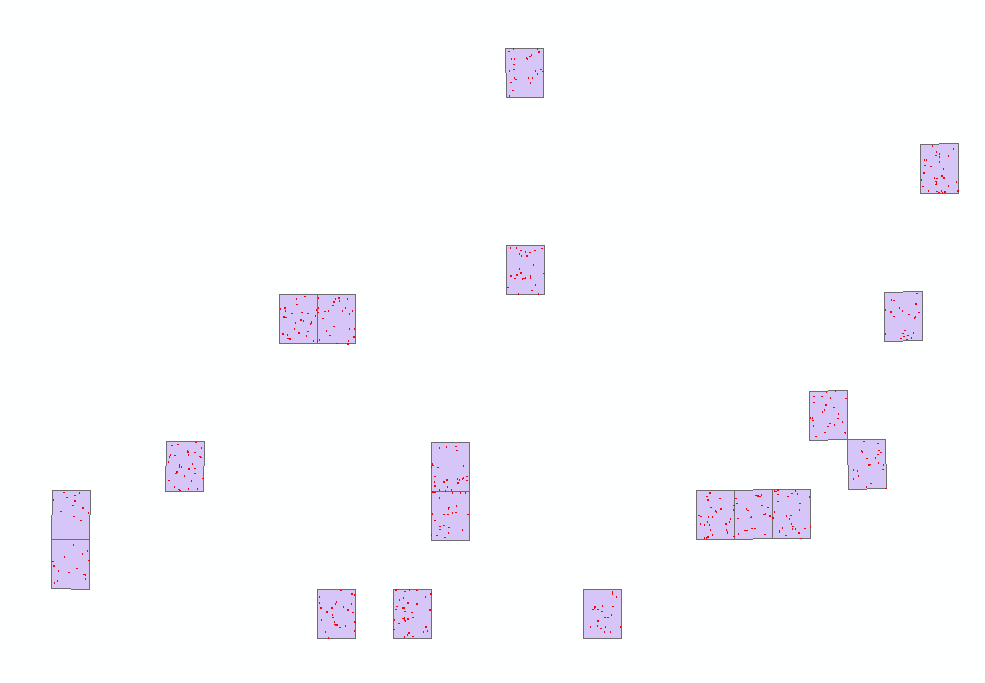
I'm in the process of classifiying NAIP imagery which will be used to generate training and validation for a Landsat model of tree cover. I've got 1348 random polygons scattered across 19 different NAIP tiles. In the left figure the purple polygons represent NAIP tiles and the tiny red dots are random points. Finding the cell count would involve 4 classes x 19 tiles = 76 runs of the Zonal Statistics tool in ArcGIS.
 The Multiple Raster Zonal Statistics tool automates the process using two loops. First it loops through the NAIP tiles and then it loops through each class in the categorical raster. The resulting output has same number of polygons as the original input, but is attributed with cell counts from each categorical class. You can see on the map in the figure on the right that the polygons are colored according to percent tree cover.
Some caveats: You may need to edit the code slightly if you wish to process more than 4 categories. There are instructions on how to do so in the python script itself. Before running the tool you will also need an index shapefile attributed with the name of each raster image. I did this using the create bounding box for geodatasets tool in the Marine Geospatial Ecology Tools.
Here is an example of how I've been using the tool.
I'm in the process of classifiying NAIP imagery which will be used to generate training and validation for a Landsat model of tree cover. I've got 1348 random polygons scattered across 19 different NAIP tiles. In the left figure the purple polygons represent NAIP tiles and the tiny red dots are random points. Finding the cell count would involve 4 classes x 19 tiles = 76 runs of the Zonal Statistics tool in ArcGIS.
Some caveats: You may need to edit the code slightly if you wish to process more than 4 categories. There are instructions on how to do so in the python script itself. Before running the tool you will also need an index shapefile attributed with the name of each raster image. I did this using the create bounding box for geodatasets tool in the Marine Geospatial Ecology Tools.
Subscribe to:
Posts (Atom)